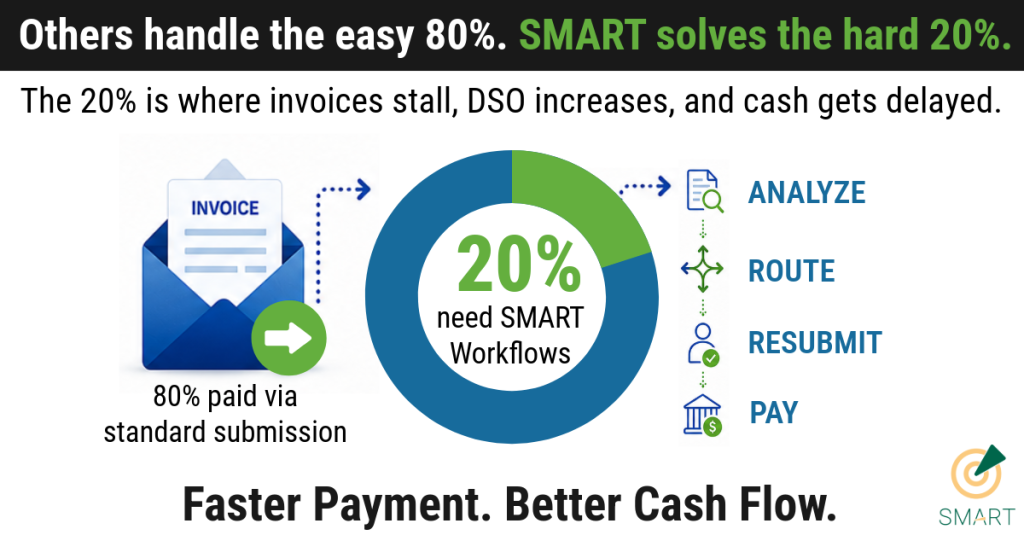
20% of Invoices Stall and need workflows
Submitting an invoice through a customer vendor portal is the starting line, not the finish line.
For many accounts receivable teams, the process looks complete once an invoice is uploaded. But customer vendor portals are not passive submission tools. They are compliance gateways with their own rules, approval logic, formatting standards, matching requirements, and failure points.
When something goes wrong, the AR team may not know until the invoice is already past due.
That creates a hidden cash flow problem: inflated DSO, delayed collections, strained customer relationships, and cash that should already be in your account. The source draft identifies this exact issue: portal errors can quietly delay payment while finance teams continue chasing balances that should have already moved through the customer’s process.
One missing data point can silently reject your invoice while your payment window keeps ticking. Once corrected, the clock on the customer’s terms starts all over again.
Customer Vendor Portals Are Compliance Gatekeepers
Customer vendor portals like Ariba, Coupa, OpenInvoice, and Amazon Business each have their own requirements. Every portal may apply different rules for purchase order matching, invoice formatting, field validation, document uploads, approval routing, and payment status visibility.
That means the challenge is not just submitting the invoice.
The real challenge is confirming that the invoice was accepted, matched correctly, routed to the right reviewer, approved for payment, and reconciled once paid.
Without that visibility, AR teams are forced into a reactive process: checking portals manually, chasing customer AP teams, correcting errors late, and watching payment timelines restart.
4 Ways Customer Vendor Portals Delay Cash Flow
1. Required Field Failures
A single missing or misformatted field can prevent an invoice from moving forward.
Common examples include:
- Tax ID errors
- Missing contact names
- Incorrect customer codes
- Invalid cost center fields
- Incomplete invoice details
- Incorrect attachment references
In many portals, these errors do not always trigger a clear alert. The invoice may sit in a queue, unresolved and unpaid, until someone manually checks the portal.
2. PO Matching Logic Mismatches
Every customer portal applies its own purchase order matching rules.
An invoice can be delayed if:
- Invoice amounts do not match exactly
- Quantities differ from the PO
- PO numbers are entered in the wrong format
- Line items do not match customer records
- Supporting documents are missing or mismatched
Even small discrepancies can trigger exceptions. From the AR team’s perspective, the invoice may appear submitted. From the customer’s system perspective, it may be blocked.
3. SKU and Line-Level Mismatches
Many customer portals now require item-level accuracy.
That means the portal may compare invoice details against catalog records, SKUs, item descriptions, pricing, quantities, or contracted terms. If the product was delivered correctly but the invoice does not match the portal’s expected format, payment can still be delayed.
This is especially frustrating because the operational work is complete, but cash collection stalls because the invoice does not satisfy the customer portal’s data requirements.
4. Formatting, Search, and Document Standards
Portal requirements often extend beyond invoice data.
Customer portals may enforce specific standards for:
- Date formats
- Decimal conventions
- PDF naming rules
- Attachment types
- Invoice number formatting
- Searchable document fields
- Required backup documentation
A formatting issue may not always look like a rejection. In some cases, it can make the invoice difficult for the customer’s AP team to locate or process. The source draft notes that non-compliance can make an invoice effectively unfindable inside the customer’s portal workflow.
Why Portal Invoice Rejections Increase DSO
The biggest cost of portal invoice errors is not only the original rejection.
It is the reset.
When an invoice is rejected, corrected, and resubmitted, the customer’s payment terms may restart from the corrected submission date. A Net 30 invoice that sat unresolved for three weeks may not become due in nine days. It may become due thirty days after resubmission.
That delay compounds quickly across dozens of portals and hundreds of invoices. For CFOs and finance leaders, this is not a clerical issue. It is a working capital issue.
The Better Approach: Manage the Workflow After Submission
High-performing AR teams do not submit invoices and hope they get paid.
They build a controlled vendor portal management process around every portal they touch.
That process includes:
- Validating invoice acceptance
- Monitoring approval status
- Identifying rejections quickly
- Analyzing root causes
- Routing exceptions to the right department
- Correcting and resubmitting invoices
- Tracking remittance activity
- Reconciling payment data back to AR
This is where technology and process discipline make the difference.
How TCD SMART Workflows Help AR Teams Get Paid Faster
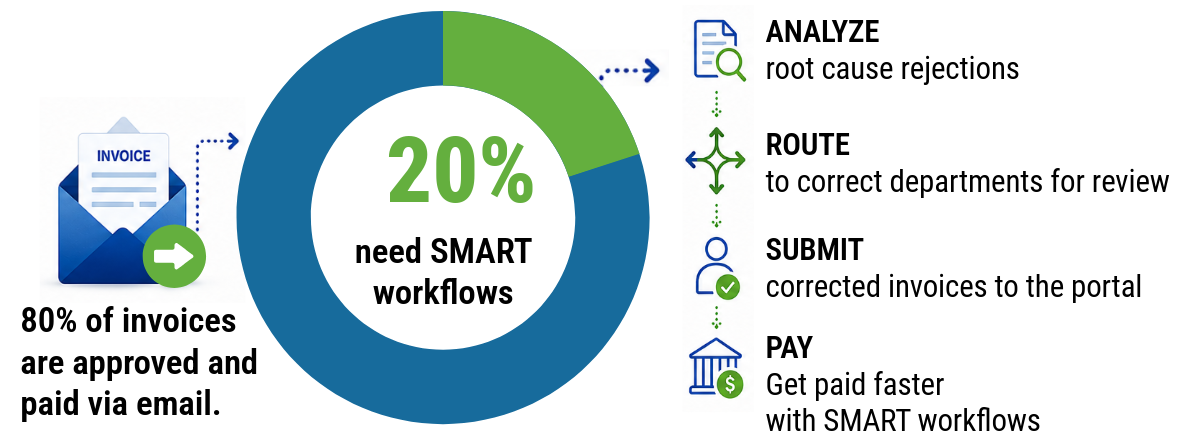
Many invoices may be submitted and paid without issue. The hard part is the remaining group that requires review, correction, rerouting, resubmission, or follow-up.
SMART Workflows help AR teams:
- Analyze portal rejections for root cause
- Route exceptions to the correct internal or customer contact
- Resubmit corrected invoices quickly
- Monitor invoice, dispute, and remittance status
- Reduce manual portal checking
- Improve visibility across customer-specific workflows
- Accelerate payment resolution
The result is faster payment, better cash flow, and stronger control over the customer vendor portal process.
Stop Letting Portal Errors Delay Cash Flow
But submitting invoices is not enough.
Finance teams need visibility into what happens after submission: whether the invoice was accepted, whether it matched correctly, whether it was routed properly, whether it was approved, and whether it is moving toward payment.
TCD’s Vendor Portal Financial Control Framework helps AR teams catch errors early, reduce DSO, and recover cash across every portal they manage.